

TM 5-2410-240-10
0004
OPERATOR CONTROLS AND INDICATORS CONTINUED
Switch Panel
0004
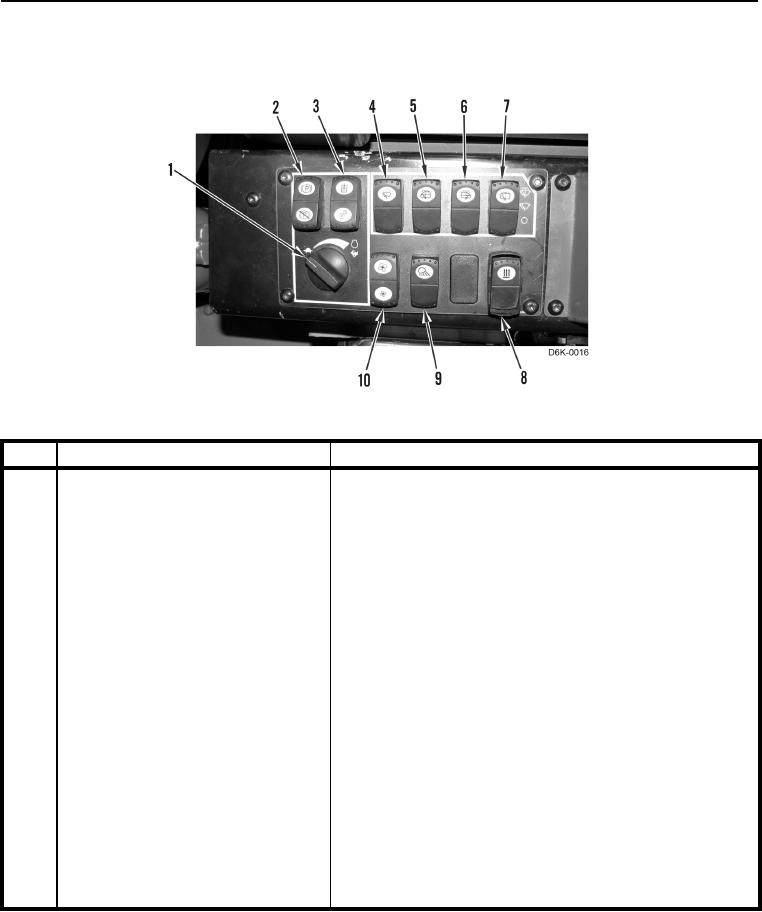
Figure 9. Switch Panel.
0004
KEY
COMPONENT
DESCRIPTION
1
Engine Throttle Switch
Multi-position switch used to control engine speed.
Turn switch clockwise to increase engine speed.
Turn switch counterclockwise to decrease engine speed.
2
Parking Brake Switch
Push top of switch to engage parking brake.
Push bottom of switch to disengage parking brake.
3
Implement Lockout Switch
Push top of switch to lockout implement controls.
Push bottom of switch to unlock implement controls.
4
Front Window Wiper Control Switch
Push top of switch to activate front window wiper.
Push bottom of switch one time to turn off wiper.
Push and hold top of switch to activate front and rear window
washers and window wipers.
5
Left Door Wiper Switch
Push top of switch to activate left door window wiper.
Push bottom of switch one time to turn off wiper.
Push and hold top of switch to activate left door window
washer and window wiper.
6
Right Door Wiper Switch
Push top of switch to activate right door window wiper.
Push bottom of switch one time to turn off wiper.
Push and hold top of switch to activate right door window
washer and window wiper.
0004-12