

TM 5-2410-240-10
0004
OPERATOR CONTROLS AND INDICATORS CONTINUED
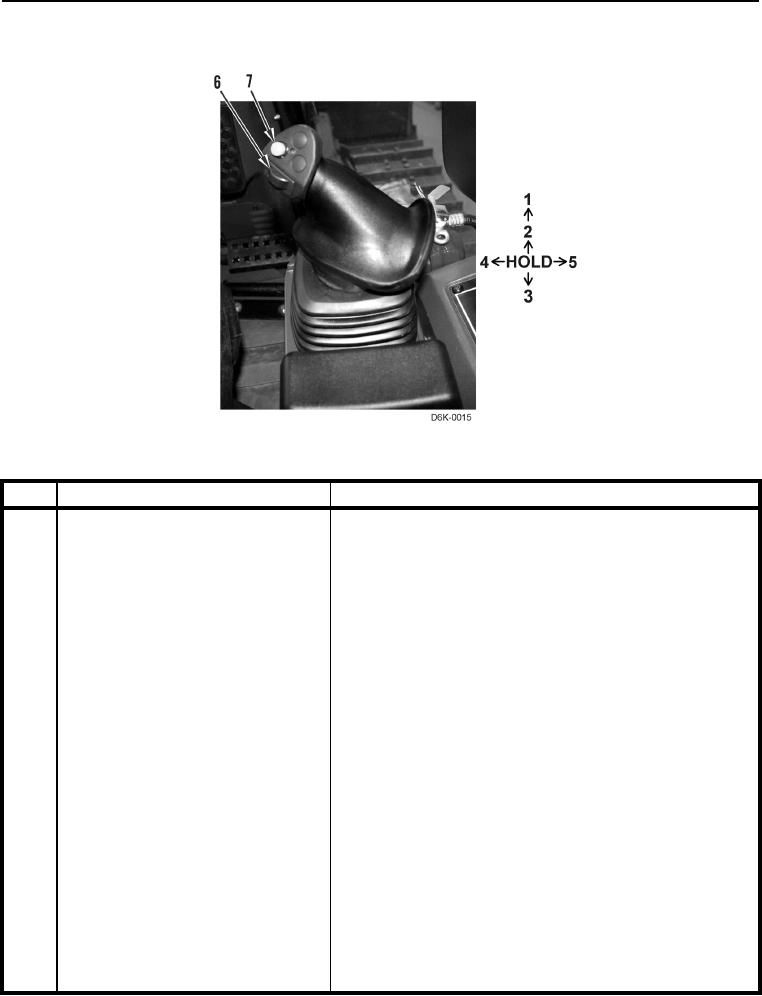
Right Joystick Dozer Controls
0004
Figure 8. Right Joystick Controls.
0004
KEY
COMPONENT
DESCRIPTION
1
Float
Push joystick forward past detent to engage blade float. Float
allows blade to move up and down with ground contour.
Joystick returns to HOLD (center) position when released.
Blade will remain in float until joystick is moved out of HOLD
position.
2
Lower
Push joystick forward to lower blade. Joystick will return to
HOLD position when released. Blade will remain in desired
position until operator commands different blade position.
3
Raise
Pull joystick backward to raise blade. Joystick will return to
HOLD position when released. Blade will remain in desired
position until operator commands different blade position.
4
Tilt Left
Pull joystick left to lower left side of blade. Joystick will return
to HOLD position when released. Blade will remain in desired
position until operator commands different blade position.
5
Tilt Right
Push joystick right to lower right side of blade. Joystick will
return to HOLD position when released. Blade will remain in
desired position until operator commands different blade
position.
6
Blade Angle Control Wheel
Roll control wheel left (clockwise) to angle blade to right.
Roll control wheel right (counterclockwise) to angle blade to
left.
7
Blade Shake
Push blade shake button to blade. Blade will continue to shake
as long as button is held.