

TM 5-2410-240-23-3
0184
REMOVAL CONTINUED
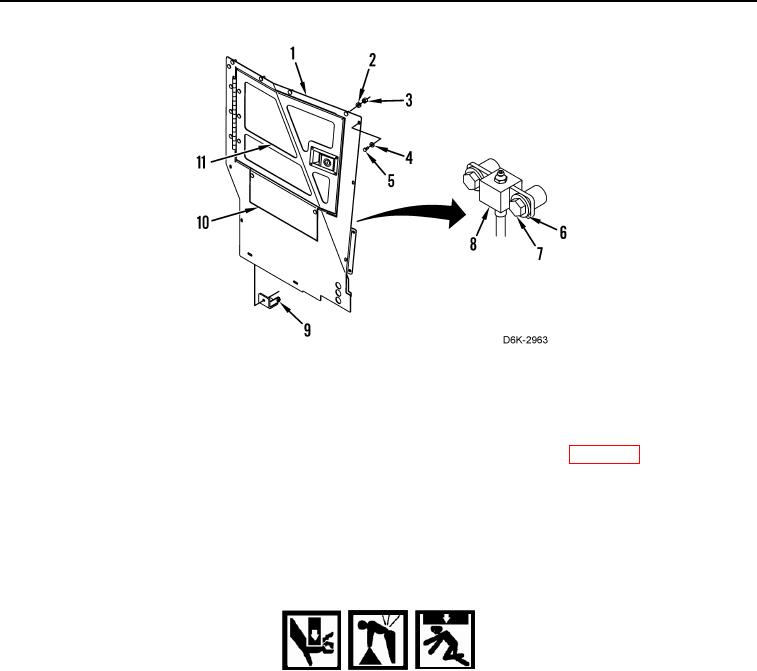
Figure 2. Left Side Panel and Retaining Hardware.
0184
END OF TASK
CLEANING AND INSPECTION
000184
Clean and inspect all components IAW Mechanical General Maintenance Instructions (WP 0282).
END OF TASK
INSTALLATION
000184
1. Install bracket (Figure 2, Item 9) on machine with washer (Figure 2, Item 4) and bolt (Figure 2, Item 5).
WARN I N G
Use extreme caution when handling heavy parts. Provide adequate support and use
assistance during procedure. Failure to follow this warning may result in injury or death to
personnel.
N OT E
Left side panel assembly weighs approximately 100 lb (45 kg).
2. With assistance, install left side panel (Figure 2, Item 1) on machine.
3. Secure left side panel (Figure 2, Item 1) to machine with six washers (Figure 2, Item 4) and bolts (Figure 2,
Item 5).
4. Install greasepoint (Figure 2, Item 8) on left side panel (Figure 2, Item 1) with two washers (Figure 2, Item 6)
and bolts (Figure 2, Item 7).
5. Secure left side panel (Figure 2, Item 1) to machine with five washers (Figure 2, Item 2) and nuts (Figure 2,
Item 3).
6. Open left front access door (Figure 2, Item 11) and install lower access door (Figure 2, Item 10).
7. Close left front access door (Figure 2, Item 11).