

TM 5-2410-240-23-1
0016
SOFTWARE INSTALLATION AND CONNECTING MSD
00016
N OT E
First time users, review MSD opeator's training installed on MSD.
r
If this is the first use of ElectronicTechnician (ET), perform steps 1 through 3.
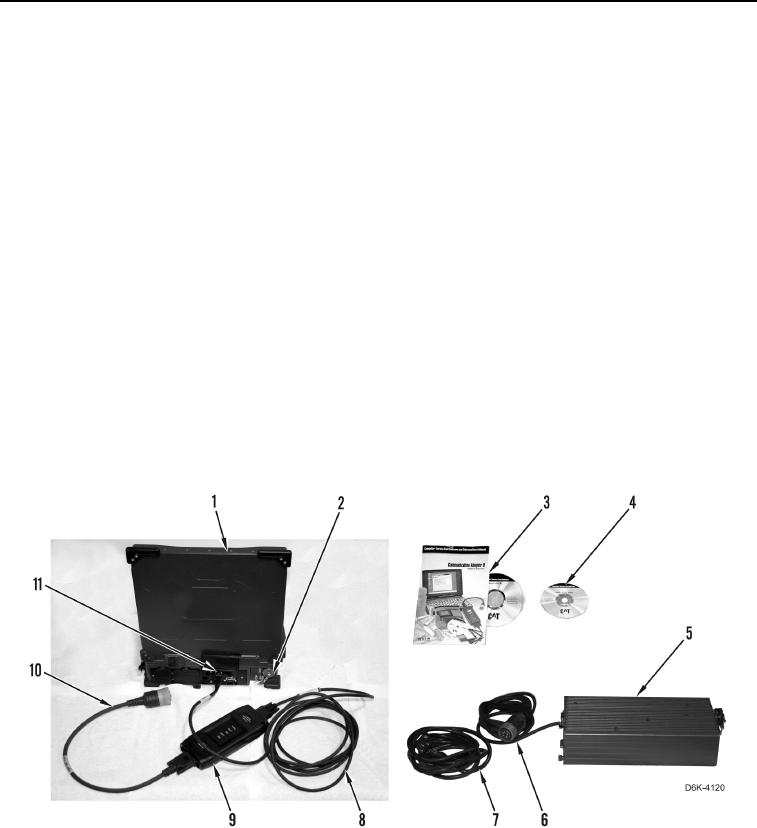
1. Install communication adapter driver software (Figure 1, Item 3) on MSD (Figure 1, Item 1) if required.
2. Install ET software (Figure 1, Item 4) on MSD (Figure 1, Item 1).
3. Review tutorial on built-in trainer in ET.
END OF TASK
CONNECTING MSD
00016
1. Turn ignition switch and battery disconnect switch to off position.
2. Connect cable (Figure 1, Item 8) to COMPUTER end of communication adapter (Figure 1, Item 9) and to USB
port (Figure 1, Item 11) of MSD (Figure 1, Item 1).
3. Connect cable (Figure 1, Item 10) to DATA LINK end of communication adapter (Figure 1, Item 9).
4. If power supply is available, connect supply power cable (Figure 1, Item 6) to power supply port (Figure 1,
Item 2) on MSD (Figure 1, Item 1).
5. If power supply is available, connect supply power cable (Figure 1, Item 7) to power supply (Figure 1, Item 5)
and power source.
Figure 1. Electronic Technician (ET).
0016