

TM 5-2410-240-23-1
0017
RECORDING DIAGNOSTIC CODES AND COPYING CONFIGURATION FROM ECM CONTINUED
3. Refer to the appropriate work package for ECM replacement instructions. Then, return to this work package to
copy saved configuration data to the new ECM. Refer to Copy Configuration to ECM in this work package.
END OF TASK
COPY CONFIGURATION TO ECM
00017
C AU T I O N
This procedure is for loading previouslysaved configuration data to the new ECM.
Failure to load this data ma impair machine performance.
y
1. Highlight applicable ECM and select OK button.
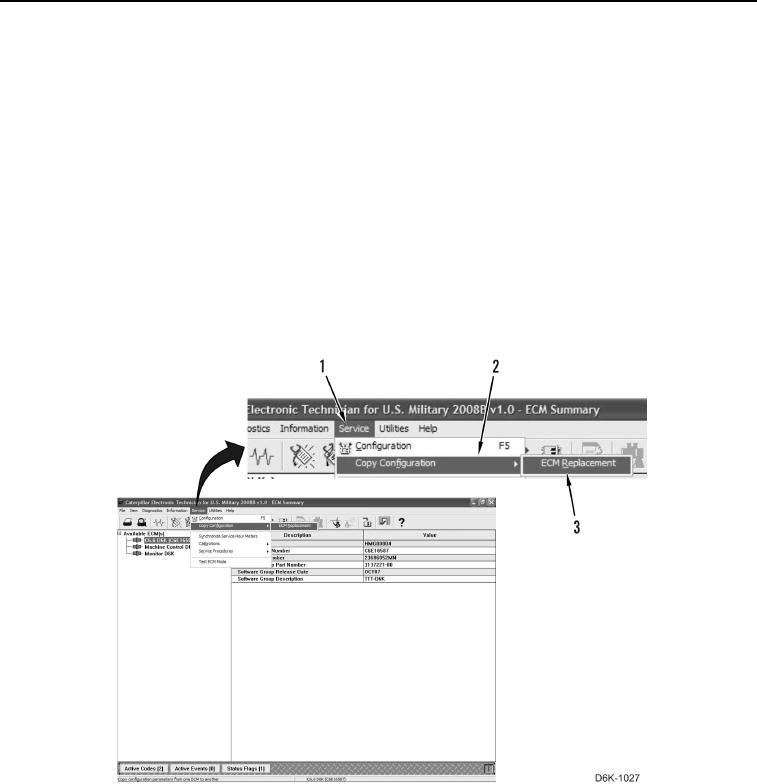
2. Ensure correct ECM is highlighted. Select Copy Configuration (Figure 5, Item 2) from Service menu (Figure 5,
Item 1) and select ECM Replacement (Figure 5, Item 3).
Figure 5. Configuration Menu.
0017