

TM 5-2410-240-23-1
0017
FLASH PROGRAMMING
00017
1. Highlight applicable ECM and select OK button.
N OT E
Flash File CD should be contained in MSD. If flash file is not available, contact your
supervisor.
Check the following website forthe latest Caterpiller ET Software and ECM Flash files:
https://akoapps/armdec.army.mil.tacom/
2. Insert flash file CD, open Windows Explorer, select drive with CD, open and read the "read me first" file. Note
correct ECM flash file and folder name.
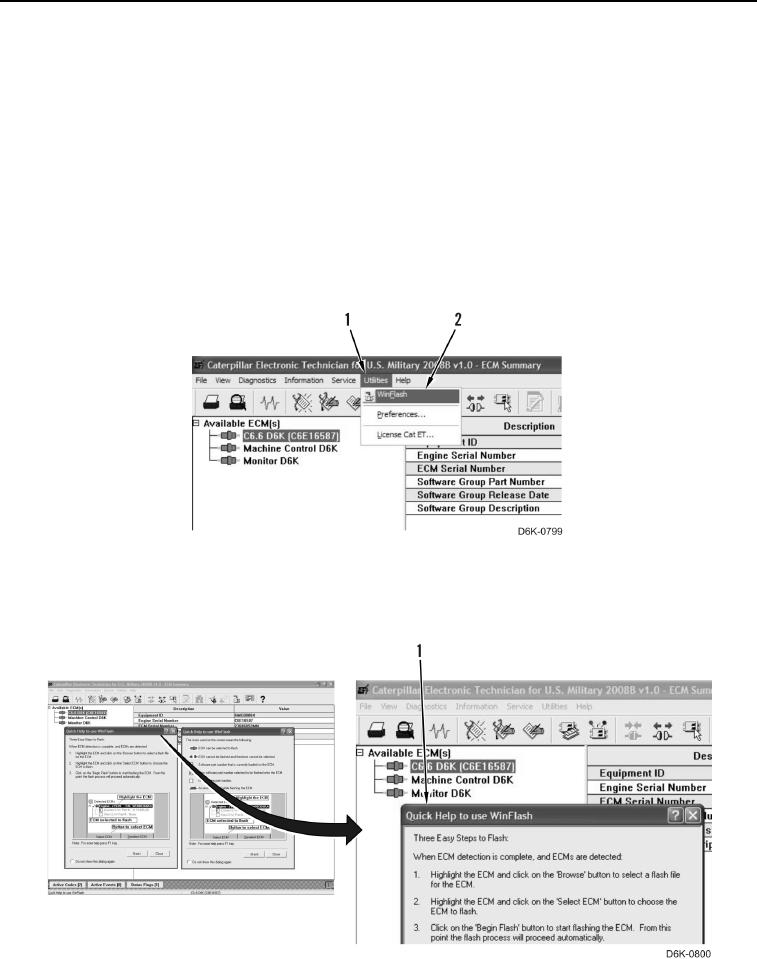
3. Select WinFlash (Figure 8, Item 2) from Utilities menu (Figure 8, Item 1). WinFlash will detect all installed
ECMs.
Figure 8. Diagnostic Connector.
0017
4. Read and close WinFlash Quick Help guide (Figure 9, Item 1).
Figure 9. Win Flash Quick Help Menu.
0017