

TM 5-2410-241-23-2
0160
DISCONNECT SWITCH TO MACHINE GROUND CABLE REMOVAL
000160
1. Remove batteries (WP 0155).
2. Remove front floor plates (WP 0230).
N OT E
Note cable routing to aid installation.
Tag and mark all electrical connections to aid installation.
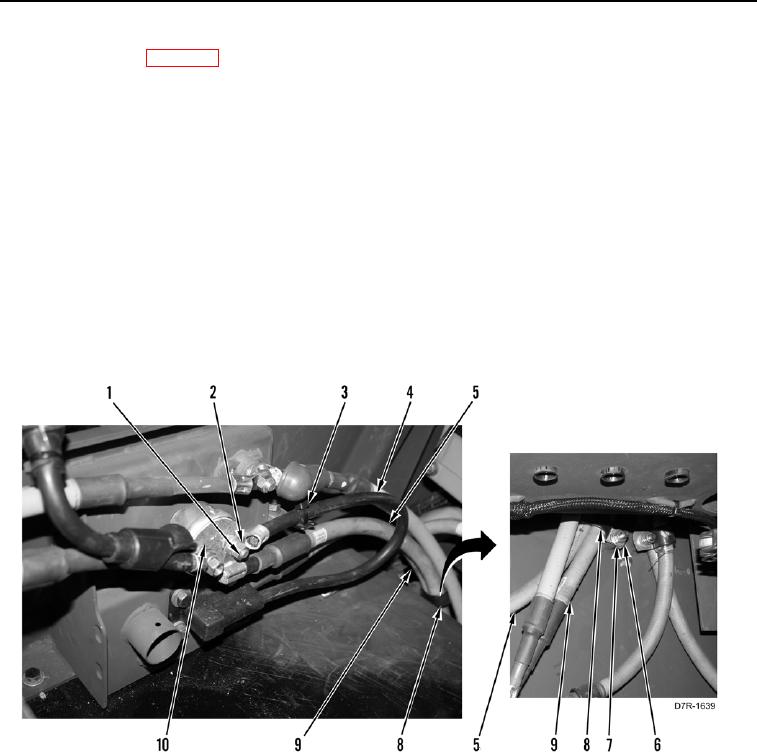
3. Remove tiedown strap (Figure 5, Item 3) from receptacle cable (Figure 5, Item 4). Discard tiedown strap.
4. Remove nut (Figure 5, Item 1), washer (Figure 5, Item 2), receptacle cable (Figure 5, Item 4), and ground cable
(Figure 5, Item 5) from battery disconnect switch (Figure 5, Item 10). Position cables aside.
N OT E
Note position and orientation of cables and clamp to aid installation.
5. Remove nut (Figure 5, Item 6), washer (Figure 5, Item 7), and clamp (Figure 5, Item 8) from ground cable
(Figure 5, Item 5) and receptacle power cable (Figure 5, Item 9).
Figure 5. Switch Cable.
0160