

TM 5-2410-240-23-1
0015
MONITORING SYSTEM WARNINGS CONTINUED
Compact Instrument Cluster (CIC) Menu Navigation
00015
This display area shows the numerous menus and submenus used to navigate modes. The display area depends
on the menu or the submenu that is selected to show the information in the system, system status, and operator
warnings. The display area on the Messenger module has two basic modes of operation: normal operation mode,
which is the default mode, and menu mode.
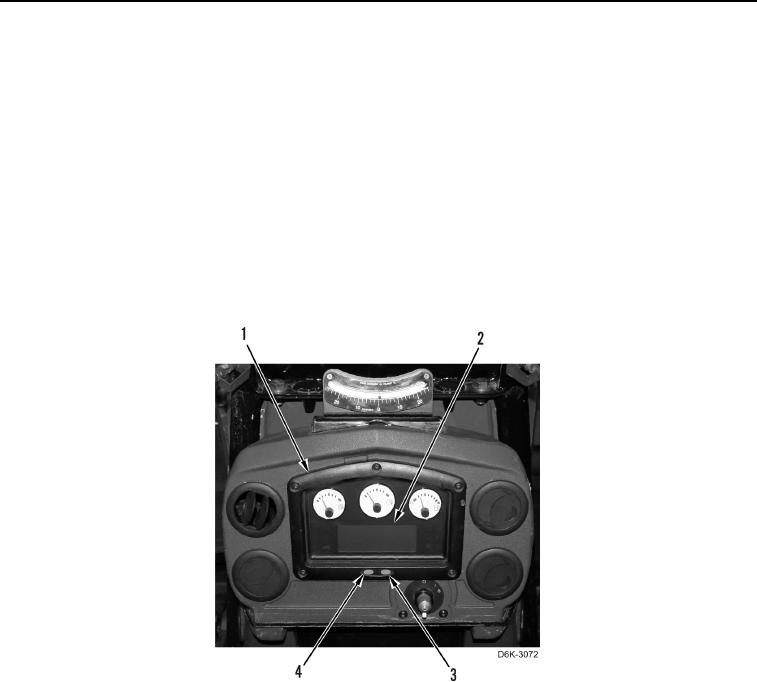
Menu navigation of the compact instrument cluster (CIC) (Figure 2, Item 1) is through the mode button (Figure 2,
Item 4) and the scroll button (Figure 2, Item 3). The menu selection will be observed on the LCD display (Figure 2,
Item 2) of the CIC (Figure 2, Item 1).
The CIC is capable of displaying four operator modes and six service modes. To navigate between modes, press
and release the mode button (Figure 2, Item 4). To scroll through all screens within a mode, press and release the
scroll button (Figure 2, Item 3). To switch between operator mode and service mode, press and hold the mode
button (Figure 2, Item 4) and the scroll button (Figure 2, Item 3) for three seconds. Do the same action to return
back to operator mode.
Figure 2. Compact Instrument Cluster (CIC).
0015