

TM 5-2410-240-23-1
0015
MONITORING SYSTEM WARNINGS CONTINUED
Messenger Module Menu Navigation
00015
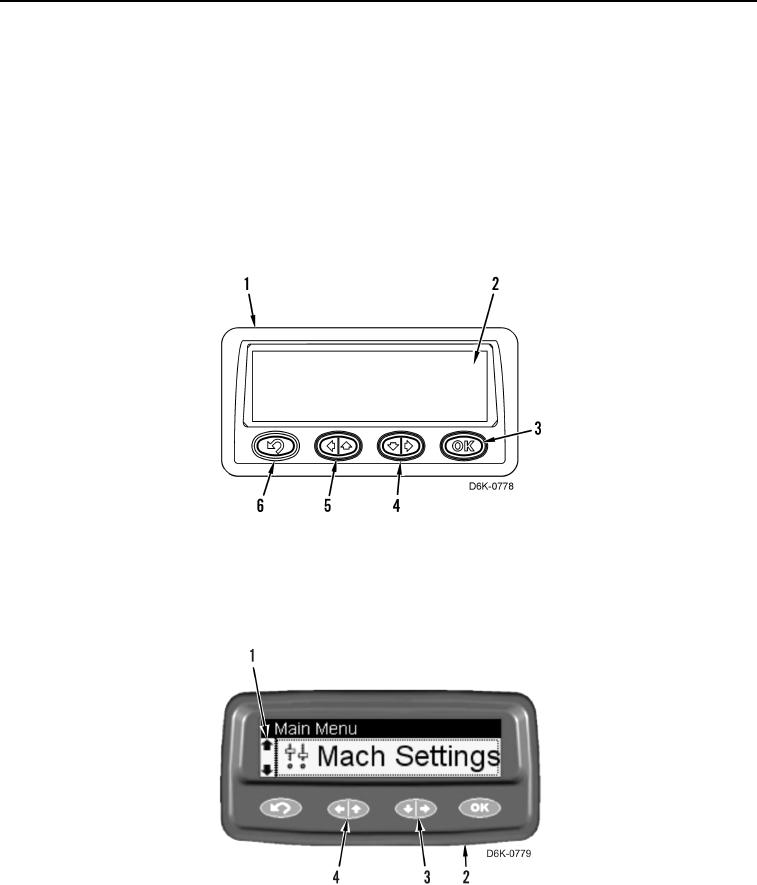
The Messenger module (Figure 5, Item 1) has eight menus available for navigation. The menus will display on the
LCD screen (Figure 5, Item 2). The menus of the Messenger module allow the user to view more information about
the machine or to set up certain operating conditions. Due to the size of the display, only one menu will appear at a
time. Use navigation buttons to move between menu options.
The Messenger module always returns to the base or default menu when the machine is turned off. To access
other menus, press and release the BACK button (Figure 5, Item 6). Press and release the LEFT/UP button
(Figure 5, Item 5), and RIGHT/DOWN button (Figure 5, Item 4) to scroll through available menus or to view
additional screens within a menu. Press and release the OK button (Figure 5, Item 3) to select highlighted menu.
Press and release the BACK button (Figure 5, Item 6) to return to the previous menu selection.
Figure 5. Messenger Module.
0015
The Messenger module (Figure 6, Item 2) uses UP or DOWN icons (Figure 6, Item 1) to indicate that more
information is available on another page. Use the LEFT/UP button (Figure 6, Item 4), and the RIGHT/DOWN
(Figure 6, Item 3) button to scroll through the available pages.
Figure 6. Messenger Module Navigation Icons.
0015