

TM 5-2410-240-23-2
0091
ALTERNATOR REMOVAL CONTINUED
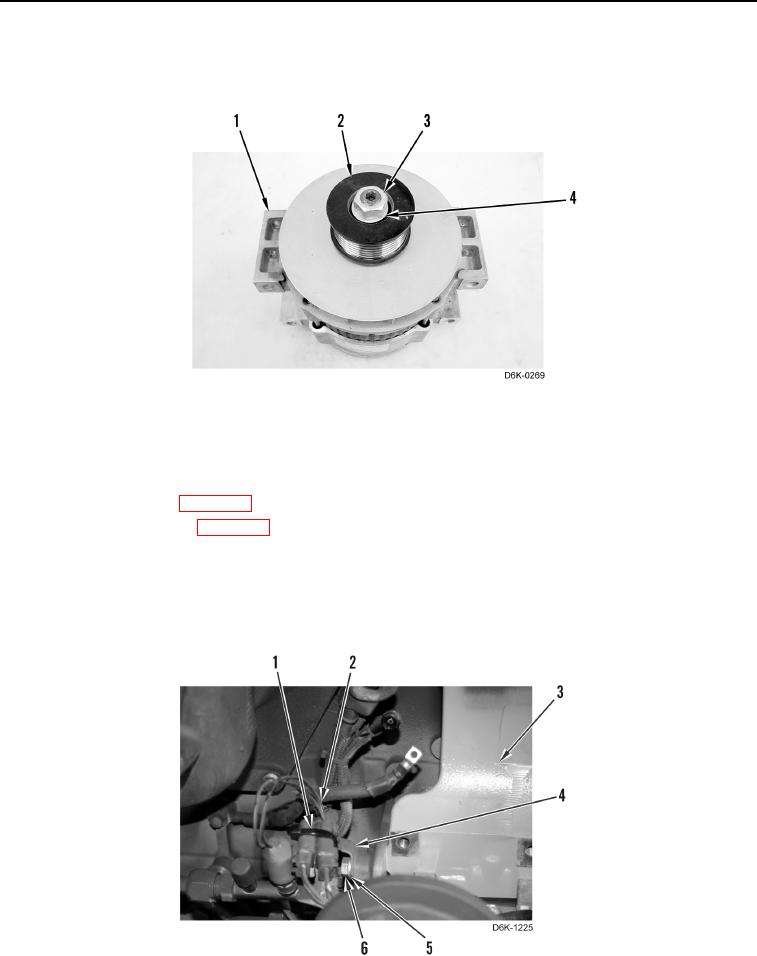
8. Remove nut (Figure 3, Item 3), washer (Figure 3, Item 4), and pulley (Figure 3, Item 2) from alternator
(Figure 3, Item 1).
Figure 3. Pulley.
0091
END OF TASK
ALTERNATOR BRACKET REMOVAL
00091
1. Remove belt tensioner (WP 0090).
2. Remove A/C compressor (WP 0092).
3. Remove tiedown strap (Figure 4, Item 1) from bracket (Figure 4, Item 4). Position harness (Figure 4, Item 2)
aside. Discard tiedown strap.
4. Remove bolt (Figure 4, Item 6), washer (Figure 4, Item 5), and bracket (Figure 4, Item 4) from alternator
bracket (Figure 4, Item 3).
Figure 4. Harness to Bracket.
0091