

TM 5-2410-240-23-2
0097
REMOVAL CONTINUED
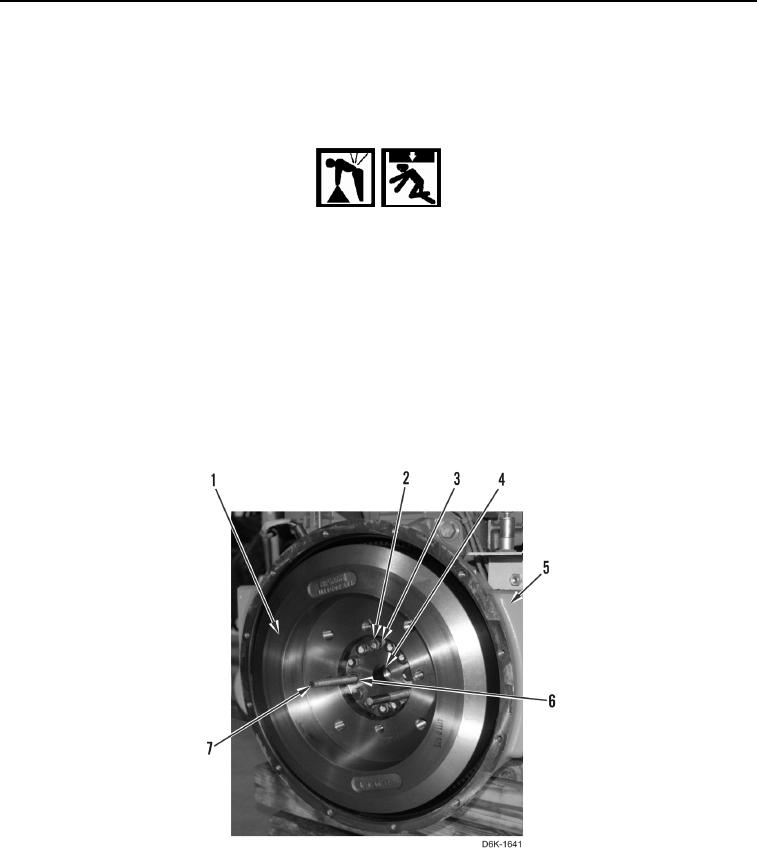
3. Install two guide studs (Figure 2, Item 7) on crankshaft (Figure 2, Item 4) through bolt holes (Figure 2, Item 6).
4. Remove 10 remaining bolts (Figure 2, Item 2) and washers (Figure 2, Item 3) retaining flywheel (Figure 2,
Item 1) on crankshaft (Figure 2, Item 4).
WARN I N G
Use extreme caution when handling heavy parts. Provide adequate support and use
assistance during procedure. Ensure any lifting device used is in good condition and of
suitable load capacity. Keep clear of heavy parts supported only by lifting device. Failure
to follow this warning may cause injury or death to personnel.
N OT E
Flywheel weighs approximately 167 lb (75 kg).
5. Using lifting device and with assistance, remove flywheel (Figure 2, Item 1) from flywheel housing (Figure 2,
Item 5). Lower flywheel onto flat surface.
6. Remove lifting device from flywheel (Figure 2, Item 1).
Figure 2. Flywheel, Guide Studs, and Retaining Hardware.
0097
END OF TASK