

TM 5-2410-240-23-2
0049
DISASSEMBLY
00049
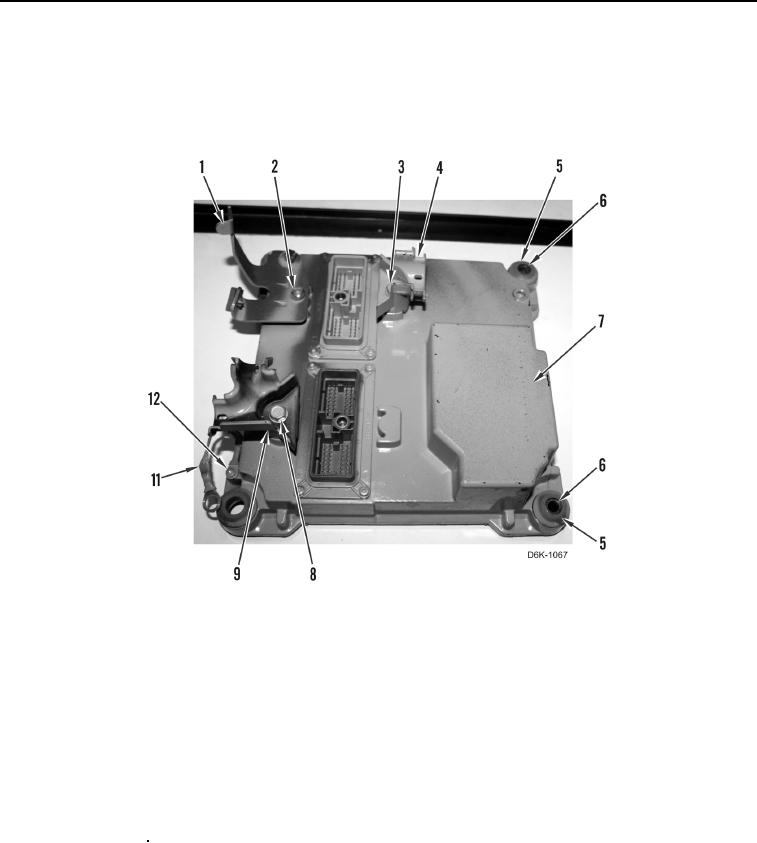
1. Remove eight mount isolators (Figure 4, Item 5), four spacers (Figure 4, Item 6), bolt (Figure 4, Item 12), and
ground strap (Figure 4, Item 11) from ECM (Figure 4, Item 7).
2. Remove machine bolt (Figure 4, Item 2), bracket (Figure 4, Item 1), bolt (Figure 4, Item 3), bracket (Figure 4,
Item 4), bolt (Figure 4, Item 8), and bracket (Figure 4, Item 9) from ECM (Figure 4, Item 7).
Figure 4. ECM.
0049
END OF TASK
CLEANING AND INSPECTION
00049
1. Clean and inspect all mechanical parts IAW Mechanical General Maintenance Instructions (WP 0282).
2. Clean and inspect all electrical components IAW Electrical General Maintenance Instructions (WP 0283).
END OF TASK
ASSEMBLY
00049
1. Install bracket (Figure 4, Item 9), bolt (Figure 4, Item 8), bracket (Figure 4, Item 4), bolt (Figure 4, Item 3),
bracket (Figure 4, Item 1), and machine bolt (Figure 4, Item 2) on ECM (Figure 4, Item 7).
2. Install eight mount isolators (Figure 4, Item 5), four spacers (Figure 4, Item 6), ground strap (Figure 4, Item 11),
and bolt (Figure 4, Item 12) on ECM (Figure 4, Item 7).
END OF TASK