

TM 5-2410-240-23-2
0144
REMOVAL
000144
WARN I N G
Make sure master battery switch is in off position before replacing alternator and junction
box harness. Failure to follow this warning may result in injury or death to personnel or
damage to equipment.
N OT E
Tag and mark electrical connectors to aid installation.
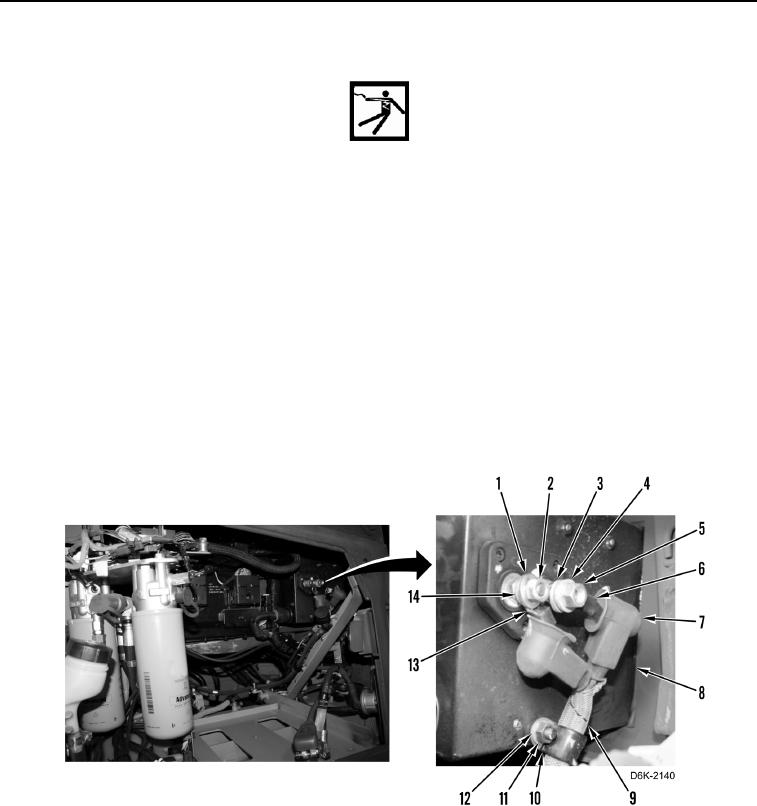
1. Position two boots (Figure 1, Item 7) aside.
2. Remove nut (Figure 1, Item 5), washer (Figure 1, Item 4), cable (Figure 1, Item 6), and washer (Figure 1,
Item 3) from junction box (Figure 1, Item 8).
3. Remove nut (Figure 1, Item 2), washer (Figure 1, Item 1), cable (Figure 1, Item 13), and washer (Figure 1,
Item 14) from junction box (Figure 1, Item 8).
4. Remove nut (Figure 1, Item 11), washer (Figure 1, Item 12), and clamp (Figure 1, Item 10) from junction box
(Figure 1, Item 8).
5. Remove clamp (Figure 1, Item 10) from harness (Figure 1, Item 9).
Figure 1. Cable Connections at Junction Box.
0144