

TM 5-2410-240-23-3
0268
WINCH CABLE REMOVAL
000268
WARN I N G
Wear heavy leather-palmed work gloves when handling winch cable. Winch cable can fray
or contain broken wires. Never let moving winch cable slide through hands, even when
wearing gloves. Failure to follow this warning may cause injury to personnel.
1. Turn battery disconnect switch ON (TM 5-2410-240-10).
2. Start engine (TM 5-2410-240-10).
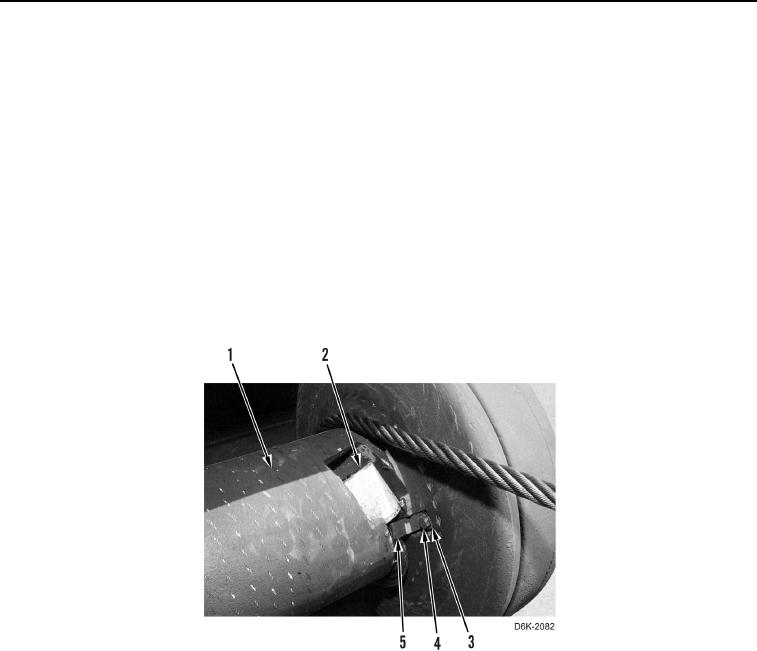
3. Reel out winch cable (Figure 1, Item 2) (TM 5-2410-240-10).
4. Shut engine OFF (TM 5-2410-240-10).
5. Turn battery disconnect switch OFF (TM 5-2410-240-10).
6. Remove bolt (Figure 1, Item 4), lockwasher (Figure 1, Item 3), clamp (Figure 1, Item 5), and winch cable
(Figure 1, Item 2) from drum (Figure 1, Item 1). Discard lockwasher.
Figure 1. Winch Cable and Retaining Hardware.
0268
END OF TASK