

TM 5-2410-240-23-3
0268
HOOK, CLEVIS, AND LATCH INSTALLATION
000268
WARN I N G
Wear eye protection when installing latch on hook. Failure to follow this warning may
cause injury to personnel.
N OT E
Install springs as noted during removal.
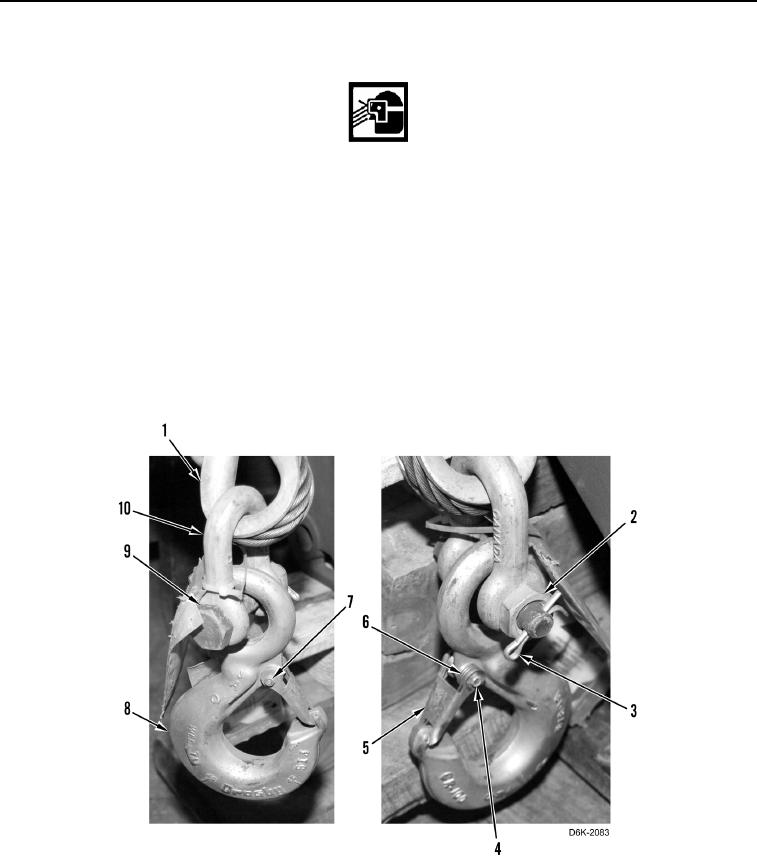
1. Install two springs (Figure 3, Item 6), latch (Figure 3, Item 5), and screw (Figure 3, Item 4) on hook (Figure 3,
Item 8).
2. Install new locknut (Figure 3, Item 7) on screw (Figure 3, Item 4).
3. Install clevis (Figure 3, Item 10) on winch cable (Figure 3, Item 1).
4. Install hook (Figure 3, Item 8) and bolt (Figure 3, Item 9) on clevis (Figure 3, Item 10).
5. Install nut (Figure 3, Item 2) and new cotter pin (Figure 3, Item 3) on bolt (Figure 3, Item 9).
Figure 3. Winch Cable, Hook, Clevis, Latch, and Retaining Hardware.
0268
END OF TASK