

TM 5-2410-241-23-1
0017
RECORDING DIAGNOSTIC CODES AND COPYING CONFIGURATION FROM ECM
00017
N OT E
If ECM and MSD are not able to communicate, refer to ECM unable to communicate, in
this work package.
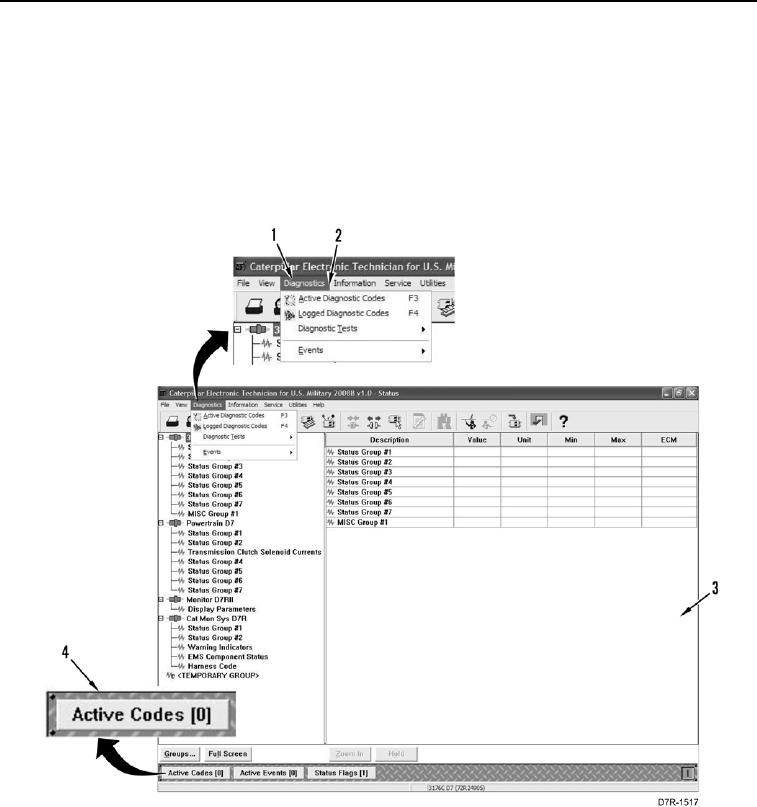
1. Use Diagnostic drop down menu (Figure 1, Item 1) and select Active Diagnostic Codes (Figure 1, Item 2), or
Active Codes icon (Figure 1, Item 4) at the bottom of the Electronic Technician (ET) screen (Figure 1, Item 3)
and record all active diagnostic codes.
Figure 1. Active Code Menu.
0017