

TM 5-2410-240-23-2
0148
CLEANING AND INSPECTION
000148
Clean and inspect all components IAW Mechanical General Maintenance Instructions (WP 0282).
END OF TASK
INSTALLATION
000148
1. Install eight isolators (Figure 3, Item 3) and four spacers (Figure 3, Item 1) on equipment ECM (Figure 3,
Item 2).
N OT E
Install electrical connectors as noted during removal.
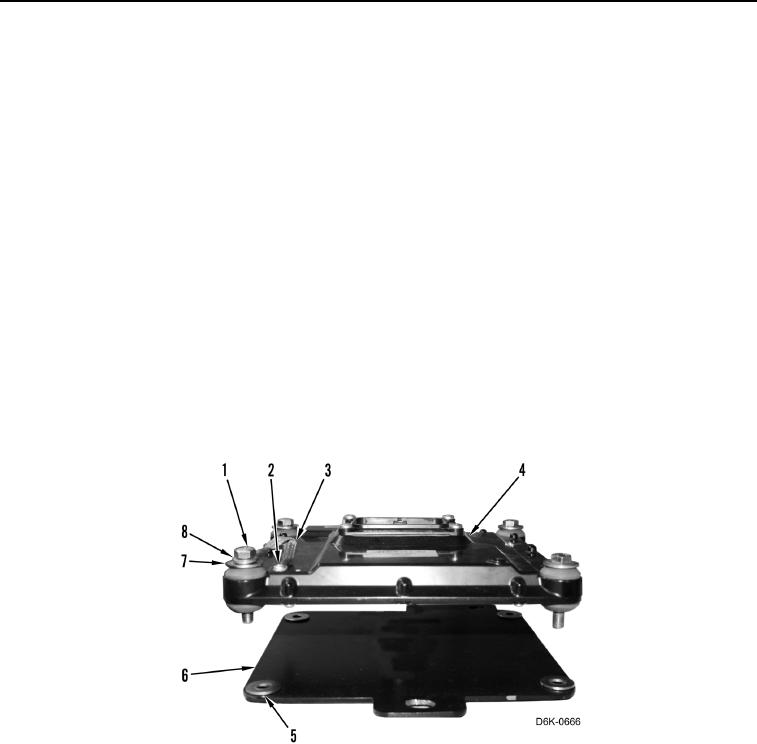
2. Install four washers (Figure 4, Item 5) and equipment ECM (Figure 4, Item 4) on mounting bracket (Figure 4,
Item 6).
3. Install four washers (Figure 4, Item 7), ground strap (Figure 4, Item 3), and washer (Figure 4, Item 8) on
equipment ECM (Figure 4, Item 4).
4. Install four bolts (Figure 4, Item 1) on retaining equipment ECM (Figure 4, Item 4) on mounting bracket
(Figure 4, Item 6).
5. Install ground strap (Figure 4, Item 3) and screw (Figure 4, Item 2) on equipment ECM (Figure 4, Item 4).
Figure 4. Equipment ECM, Mounting Bracket, and Retaining Hardware.
0148