

TM 5-2410-241-23-1
0022
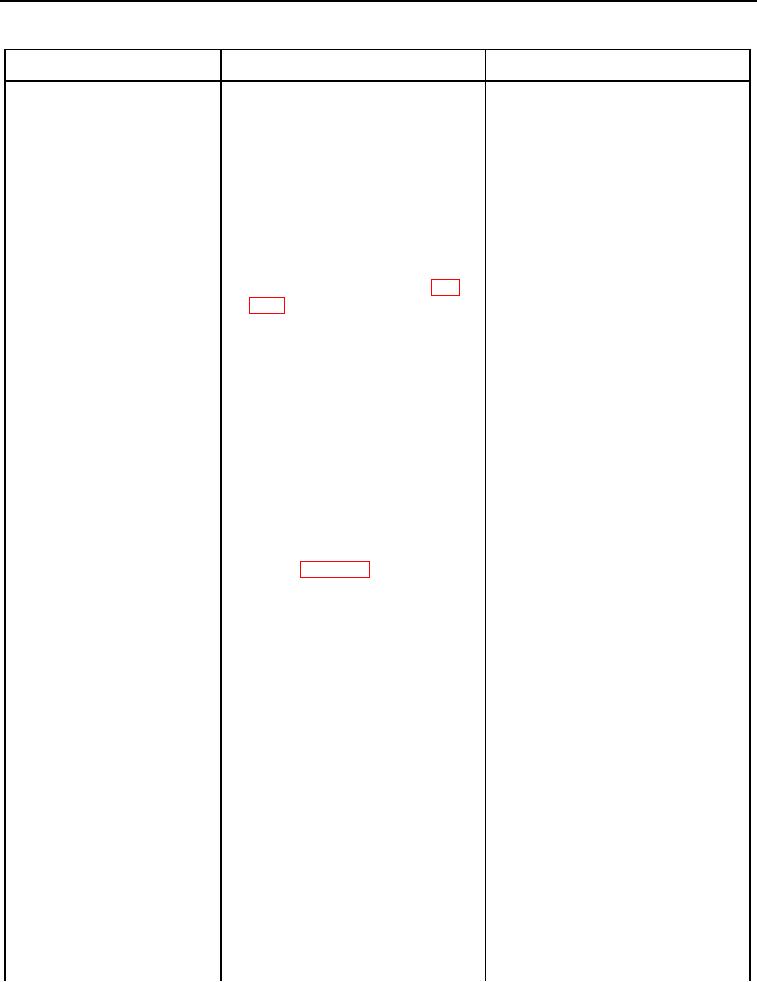
Table 1. Cab Troubleshooting Procedures - Continued.
0022
MALFUNCTION
TEST OR INSPECTION
CORRECTIVE ACTION
ROPS Mounted Rearward
1. Inspect operation of rearward fac- 1. If left lamp does NOT work, pro-
Facing Flood Lamp(s)
ing flood lamps (TM 5-2410-241-
ceed to step 2.
Do Not Work
10).
2. If right lamp does NOT work, pro-
ceed to step 21.
3. If both lamps do NOT work, pro-
ceed to step 40.
2. Turn ignition switch and battery
disconnect switch to OFF position
(TM 5-2410-241-10).
3. Disconnect left rear flood lamp
harness connector TK-C1 (WP
0018, Figure 107) from left rear-
ward facing flood lamp.
4. Turn battery disconnect switch
and ignition switch to ON position
(TM 5-2410-241-10).
5. Turn main light switch to floodlight
position (TM 5-2410-241-10).
6. Turn rear facing floodlight switch to
ON position (TM 5-2410-241-10).
7. Using digital multimeter (WP
1. If 24 Volts is found, proceed to
0296), measure for voltage
step 8.
between pin 1 and 2 on left rear
2. If 24 Volts is NOT found. Proceed
flood lamp harness connector
to step 15.
TK-C1 (WP 0018, Figure 107).
8. Turn rear facing floodlight switch to
OFF position (TM 5-2410-241-
10).
9. Turn main light switch to OFF
position (TM 5-2410-241-10).
10. Turn ignition switch and battery
disconnect switch to OFF position
(TM 5-2410-241-10).
11. Remove and disassemble left
rearward facing flood lamp
(WP 0210).
12. Inspect inside of left rearward fac- 1. If corrosion or damage is found,
ing flood lamp for corrosion and
replace left rearward facing flood
damage.
lamp assembly (WP 0252).
Ensure all harness connectors
are reconnected. Verify correct
operation of machine (TM 5-2410-
241-10).
2. If corrosion and damage is NOT
found, proceed to step 13.